Zu Inhalt springen

How to Replace ABB DSQC679 Teach Pendant Cable

Product Introduction:

* Part no#: 3HAC031683-001
* ABB Type Designation: 10m
* ABB Description: Teach Pendant Cable (SxTPU3 Cable)
* Application: ABB Robot IRC5C Compact Controller

Attention:

The teach pendant cable is relatively easy to be broken which is very likely to burned Teach pendant motherboard. If your TeachPendant wire is to be broken, please take appropriate precautions, or replace it.

  • Difficulty: Easy
  • Steps: 6
  • Time Required: 15mins

Step 1 Open Teach Pendant Back Cover

  • There are only two screws on the cover, so it's easy to unscrew with a Phillips screwdriver

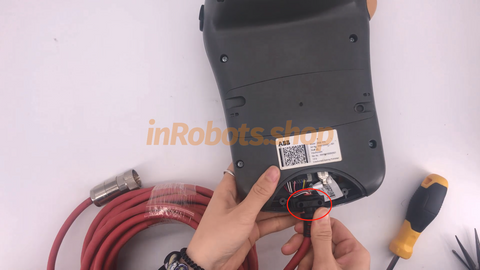
Step 2 Unplug the network cable connector

  • The white one on the right is the crystal head, there is a small switch on the crystal head, gently press it to pull out the network cable.

Step 3 Unplug the data cable interface

  • The left side of the black part is the data line, there is no card mouth, a little force to pull the line out

Step 4 (Important) Replace Your New Cable

  • Replace the new line, the network cable interface and the data line interface plug back in
  • Because the two lines of the interface is the direction, that is, if the direction of the reverse is not installed back. So if the wire does not go in, change the direction and try again on it!

Step 5 Fixed the cable

  • Align the end of the teach pendant cable with the snap of the instructor and install it.

Step 6 Put the cover on Teach Pendant

  • Put the cover on and screw it on
  • As at the beginning, lock the cover.
if you need a NEW/USED/Verified DSQC 679 Teach Pendant Cable,
Just Link Below to know more.
If you need any other spare parts else,
please fill out the form below:
{formbuilder:77171}

Explore the Full Guide: Industrial Robot Spare Parts  →  Industrial Robot Teach Pendant Center

Explore the complete guide for troubleshooting, repair strategies, and component replacement across industrial robot systems.

🔧 Recommended Parts for Teach Pendants

Key components commonly involved in teach pendants issues and replacements.

📘 Related Resources for Industrial Robot Teach Pendant Center
Vorheriger Artikel ABB Teach Pendant Dead / NoDisplay: Causes, Diagnosis & Fix Guide

Einen Kommentar hinterlassen

* Erforderliche Felder

Blog posts

Produkte vergleichen

{"one"=>"Wählen Sie 2 oder 3 Artikel zum Vergleichen aus", "other"=>"{{ count }} von 3 Elementen ausgewählt"}

Wählen Sie das erste zu vergleichende Element aus

Wählen Sie das zweite zu vergleichende Element aus

Wählen Sie das dritte Element zum Vergleichen aus

Vergleichen