
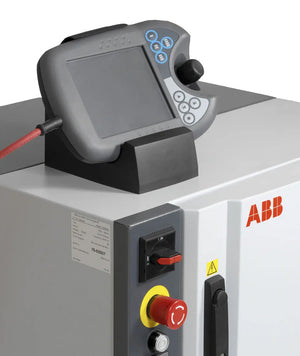

In today’s fast-paced industrial environments, reliable display systems are critical to smooth operations. From manufacturing lines to remote field stations, industrial screens serve as essential interfaces for monitoring, control, and diagnostics. These displays, however, are often exposed to harsh conditions, continuous usage, and unexpected impacts, making them vulnerable to wear or sudden failure.
A malfunctioning industrial screen can cause downtime, lost productivity, and even safety risks. That’s why screen replacement isn’t just a routine repair—it’s a strategic decision that can enhance long-term performance, safety, and efficiency.
This guide explores everything you need to know about industrial screen replacement, from durability comparisons to common failure causes, upgrade benefits, and how to find a reliable service provider.
Yes—industrial screens are significantly more robust than consumer-grade displays. They're engineered for 24/7 operation in extreme environments such as manufacturing floors, HMI panels, and robotic systems.
Key durability features include:
Rugged construction materials
Anti-glare coatings
Sealed enclosures against dust and moisture
Optical bonding for enhanced visibility and protection
These enhancements ensure longevity and reliability, even under intense heat, vibration, or impact.
Industrial screens typically require replacement due to one or more of the following issues:
Physical damage: Cracks, scratches, or broken glass from accidental impacts or drops.
Environmental stress: Water ingress, dust buildup, extreme temperatures, or prolonged sun exposure, all of which can degrade internal components.
Component failure: Problems such as flickering or dim backlights, unresponsive digitizers, or faulty connectors.
These failures can gradually reduce performance or cause sudden outages that disrupt operations.
Costs vary depending on:
Screen size and type (LCD, LED, touchscreen, etc.)
Complexity of integration with other systems
Extent of damage
Choice between OEM replacement, refurbished units, or third-party repair
While pricing differs across brands and models, screen replacement is usually far more affordable than replacing the entire machine. Repair center type (authorized vs. third-party) can also impact cost.
It depends. Consider:
Severity of the issue – minor problems like loose connections may only need repair.
Age of the screen – older models may lack available replacement parts.
Cost comparison – if repair costs approach or exceed replacement costs, upgrading is more practical.
Professional technicians can help assess the damage and guide the decision with cost estimates and part availability.
Replacing a screen offers the opportunity to upgrade to a more advanced, durable, and efficient display.
Benefits include:
Better display technology (higher resolution, brightness, wider angles)
Enhanced touch response
Stronger materials and protective coatings
Improved energy efficiency
Compatibility with newer control systems
Longer lifespan and lower maintenance costs
A modern replacement can also improve operator experience and reduce overall downtime
Choosing the right provider ensures quality repairs and minimized downtime. Look for:
Industrial specialization – experience with HMIs, PLC displays, and automation equipment
Certifications – compliance with industry standards and repair protocols
Warranty & support – reliable providers offer warranties and responsive technical help
Customer reviews – insights from past industrial clients can signal trustworthiness
Turnaround time – fast repairs reduce downtime and production losses
Quality parts – use of genuine or high-grade compatible components
Partnering with a reputable provider ensures your investment pays off in reliability and longevity.
Industrial screen replacement isn’t just about fixing what’s broken—it’s about ensuring long-term reliability and performance. By understanding when to replace, what to consider, and how to find a trustworthy provider, businesses can minimize downtime, improve safety, and keep operations running smoothly. Upgrading your screen can be one of the simplest yet most impactful improvements to your industrial systems.
A1: Yes. While industrial displays are built for wider temperature ranges than consumer screens, prolonged exposure beyond rated limits can damage internal circuitry, cause delamination, and degrade LCD components.
A2: Cleaning frequency depends on your environment. Use a soft, lint-free cloth and a non-abrasive cleaner designed for LCD/touch displays. Avoid harsh chemicals, ammonia, or spraying liquid directly on the screen.
A3:
Use screen protectors (where applicable)
Ensure proper ventilation
Clean regularly to prevent dust buildup
Secure mounting or shielding from impacts and vibration
These preventive steps help maximize screen performance and longevity.


{"one"=>"Select 2 or 3 items to compare", "other"=>"{{ count }} of 3 items selected"}
Leave a comment on this topic