

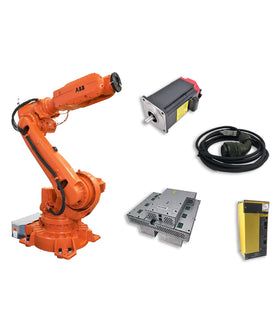

When an industrial robot spare part fails, identifying the correct replacement is not always straightforward.
The original part number may be difficult to read, the product label may be damaged, or the maintenance team may only have a photograph of the component installed inside the robot controller.
For purchasing teams and maintenance engineers, this creates an important challenge: how can you identify the correct industrial robot spare part before requesting a replacement?
A nameplate or product photo can provide valuable information, including the manufacturer, model number, electrical specifications, hardware revision, and connector type.
However, not every visible number is a part number, and two components that look almost identical may have different technical specifications.
This guide explains how to identify industrial robot spare parts using nameplates, labels, product photos, and equipment information.
The nameplate is usually the most reliable starting point when identifying an industrial robot component.
Depending on the manufacturer and product type, the label may contain several identifiers.
Common information includes:
| Label Information | What It Tells You |
|---|---|
| Part Number | Identifies the specific component or assembly |
| Model Number | Identifies the product model or series |
| Serial Number | Identifies an individual manufactured unit |
| Manufacturer | Identifies the original manufacturer |
| Hardware Revision | Indicates a particular hardware version |
| Electrical Rating | Shows voltage, current, power, or other specifications |
| Date Code | May indicate the manufacturing date or production batch |
These two identifiers should not be confused.
A model number may identify a product family, while a part number may identify a specific assembly, configuration, or replacement component.
For example, a servo amplifier may have a model designation identifying its series and a separate ordering or assembly number identifying the exact version.
When requesting a replacement, provide the complete identification information rather than relying on the product family name alone.
Before trying to interpret individual characters, take a clear photograph of the complete label.
Make sure the image includes:
The full part number
Model designation
Manufacturer name or logo
Revision information
Electrical ratings, if shown
Any additional suffixes or identification codes
Do not crop away the characters before or after the main number. A single letter or suffix can distinguish different product versions.
Industrial robot spare parts do not all use the same labeling format.
The location and type of identification information depend on the component.

For a Teach Pendant, check:
Rear housing label
Product identification sticker
Model designation
Part number
Serial number
Connector and cable interface
If the label is missing, photograph the front, rear, side profile, connector, and cable entry.
The screen layout and housing shape can help narrow down the product family, but appearance alone is not sufficient to confirm an exact replacement.

Cable identification can be more difficult because some cables have small printed markings along the jacket rather than a separate nameplate.
Look for:
Cable part number
Manufacturer markings
Cable assembly number
Connector type
Pin count
Cable length
Shielding or electrical markings, if available
Photograph both ends of the cable.
A cable may have different connectors at each end, and similar-looking connectors do not necessarily share the same pinout or electrical function.

For servo drives and amplifiers, check:
Complete model number
Ordering or assembly number
Hardware revision
Input and output ratings
Compatible motor information, if available
Connector arrangement
Electrical specifications and motor compatibility matter just as much as the physical appearance.
A drive with a similar housing or power rating should not automatically be considered interchangeable.

For robot control boards and electronic modules, look for identification labels on:
The PCB itself
Barcode stickers
Board edges
Component mounting plates
The front or rear of the assembly
Record all visible identification numbers, especially board numbers, assembly numbers, and revision markings.
A PCB may contain multiple numbers. Some identify the bare circuit board, while others identify the complete assembled module.
For replacement purposes, the complete assembly number and applicable revision are particularly important.
Sometimes the original label has been damaged, removed, or covered by dirt.
In these cases, product photographs can help narrow down the identification.
However, a photo should be treated as supporting evidence, not definitive proof of compatibility.
For better identification, prepare the following images:
| Photo | What It Helps Identify |
|---|---|
| Front view | Product type, display, buttons, overall design |
| Rear view | Labels, model information, housing details |
| Side view | Dimensions, mounting features, connectors |
| Connector close-up | Connector shape, keying, pin arrangement |
| Label close-up | Part number, revision, serial number |
| Installed view | Location and application inside the equipment |
Connectors are important identification features.
For a cable, pendant, or electronic module, photograph:
Connector shape
Number of pins or contacts
Keying and locking mechanism
Connector gender
Cable entry direction
Any visible connector markings
Do not assume that two connectors are compatible simply because they have the same number of pins or similar outer shapes.
Their wiring and electrical functions may differ.
When possible, include a ruler or another clear size reference in the photograph.
This can help distinguish components with similar appearances but different dimensions.
For electronic boards, also photograph the mounting holes, board outline, and connector positions.
A component number or photograph may not provide enough information on its own.
The robot brand and controller model can help narrow down the possible replacement options.
For example, the same product category may have different versions across controller generations.
When identifying a component, record:
Robot manufacturer
Robot model
Controller model
Controller generation
Installed component location
Relevant system or hardware revision, if available
A Teach Pendant designed for one controller generation may not work with another.
Similarly, servo drives, control boards, communication modules, and cables may have different electrical interfaces or system requirements.
The robot brand alone is not enough to confirm compatibility.
For example, identifying a component as a FANUC, ABB, KUKA, or Yaskawa part only establishes its manufacturer family. The exact model and controller information are still needed.
If the original part number is incomplete, controller information can provide useful supporting evidence during the identification process.
One of the most common identification mistakes is recording only part of a number.
Industrial robot components may have several similar-looking identifiers.
A small difference in a suffix, revision, or assembly number can indicate a different product configuration.
Before requesting a replacement, compare:
Complete part number
Model designation
Hardware revision
Assembly number
Electrical specifications
Connector arrangement
Controller compatibility
Two parts with similar numbers may belong to the same product family but have different functions or specifications.
Likewise, a newer revision is not automatically a direct replacement for an older revision.
Before accepting an alternative, request confirmation based on manufacturer documentation, an approved supersession, or other reliable technical evidence.
For more information, see:
Can Two Robot Parts with Similar Part Numbers Be Interchanged?
When a label contains small printed characters, OCR (Optical Character Recognition) can help extract the text from an image.
This can be useful when dealing with:
Small PCB identification stickers
Faded product labels
Barcode labels
Printed cable markings
Long alphanumeric part numbers
AI image recognition tools can also help describe a component's visible features or suggest possible product categories.
However, automated identification has limitations.
A recognition tool may confuse:
The letter O with the number 0
The letter I with the number 1
The letter S with the number 5
Similar-looking suffixes
Board numbers with assembly numbers
Use the following process:
Take a high-resolution photograph.
Crop the label without removing surrounding context.
Use OCR to extract the visible characters.
Compare the extracted text with the original image.
Check the number against manufacturer or supplier information.
Confirm the robot and controller model.
Verify compatibility before ordering.
Never copy an OCR result directly into a purchase order without checking the original label.
A single incorrect character can lead to an incorrect quotation or replacement.
You do not always need to know the complete part number before starting a sourcing request.
If the label is missing or unreadable, provide as much supporting information as possible.
A supplier may be able to narrow down the identification using the product appearance, robot model, controller information, connector details, and installation location.
Use the following checklist:
| Information | What to Provide |
|---|---|
| Brand | ABB, FANUC, KUKA, Yaskawa, or other |
| Robot model | Exact robot model or series |
| Controller model | Controller type and generation |
| Product category | Teach Pendant, Cable, PCB, Servo Drive, etc. |
| Visible numbers | Every readable number or code |
| Photos | Front, rear, side, connector, and label |
| Installation location | Where the component is installed |
| Failure description | What happened before replacement was needed |
| Quantity | Required number of units |
If possible, include a photograph of the original component still installed in the controller or robot system.
This can provide useful context when the component has no readable external label.
Even experienced maintenance and purchasing teams can make identification mistakes when working under time pressure.
Avoid these common problems:
A request such as "ABB FlexPendant" or "FANUC servo amplifier" may describe a broad product category.
It does not identify the exact replacement.
Provide the part number, model, and controller information whenever possible.
A small suffix may distinguish different hardware or product configurations.
Always record the full identification number.
Two boards, cables, or Teach Pendants may look almost identical but have different electrical or mechanical specifications.
Use photos to narrow down the product, then verify the exact identification and compatibility.
The most important identification label may be on the rear, side, or connector area.
Take multiple photographs before removing or discarding the original component.
A PCB can contain several identification codes.
Make sure you know whether the number refers to the bare board, assembled module, or complete replacement unit.
An identified part is not automatically a compatible replacement.
Check the robot model, controller generation, hardware revision, and relevant technical specifications before placing the order.
If you are requesting help identifying an industrial robot spare part, clear and complete photos can reduce unnecessary communication.
Before sending your request, prepare:
Product identification
If the label is damaged, send the original photo anyway. Do not try to guess missing characters.
It is better to provide an incomplete but accurate identification request than an incorrect part number.
Sometimes a photo can help identify the product category, manufacturer, or possible model.
However, a photo alone may not confirm the exact part number or compatibility. Clear label information, connector details, and controller data provide stronger evidence.
Photograph the remaining label and provide the robot model, controller model, product appearance, and connector details.
A supplier may be able to help narrow down the identification using these details.
No. A part number identifies a product or component type, while a serial number generally identifies an individual manufactured unit.
Both can be useful, but they serve different purposes.
AI image recognition can help read labels, describe visible features, and suggest possible product categories.
However, it should not be treated as final compatibility verification. Always check the extracted part number and technical information against reliable product documentation or supplier confirmation.
At minimum, send a full product photo, a clear label photo, and close-ups of the connectors.
If available, also provide the robot model, controller model, and a photo showing where the component is installed.
You can start a sourcing request with the robot model and available photos.
However, the robot model alone may not identify the exact component. Additional information is usually needed before confirming a replacement.
Ask the supplier to check for manufacturer-approved superseded parts or technically verified alternatives.
Do not assume that a newer revision or similar-looking component is interchangeable without supporting evidence.
If you have a product photo, nameplate image, or incomplete part number, you can send the available information to InRobots for a sourcing inquiry.
We support identification and sourcing requests for industrial robot spare parts across major brands, including:
ABB
FANUC
KUKA
Yaskawa
Common product categories include:
Teach Pendants and Teach Pendant Repair Parts
Robot Cables and Teach Pendant Cables
Servo Drives and Servo Motors
Control Boards and PCB Modules
Power Supply Modules
Other industrial robot components
Send us the product photos, visible identification numbers, robot model, and controller information.
Even if you do not know the complete part number, the available details can help us begin reviewing the identification and sourcing options.
Key components commonly involved in issues and replacements.
No related parts found. Please check available components in our catalog.


{"one"=>"Selecione 2 ou 3 itens para comparar", "other"=>"{{ count }} de 3 itens selecionados"}
Selecione o primeiro item para comparar
Selecione o segundo item para comparar
Selecione o terceiro item para comparar
Deixe um comentário