

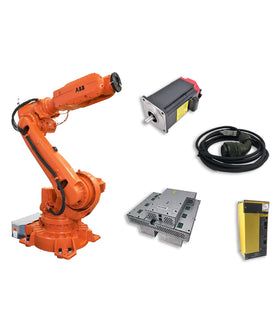

When sourcing industrial robot spare parts, maintenance teams often encounter components with very similar part numbers.
Two parts may share most of their numbers, have nearly identical appearances, or belong to the same product series. This can make it tempting to assume that one is a suitable replacement for the other.
However, similar part numbers do not automatically mean interchangeable parts.
Even a small difference in a part number can indicate changes in electrical specifications, hardware revisions, connector configurations, software compatibility, or intended applications.
Installing an incompatible component may cause communication errors, unexpected alarms, equipment malfunctions, or additional downtime.
Before replacing an industrial robot component, it is important to understand what the part number represents and how to verify whether two similar parts can actually be interchanged.
This guide explains how to compare similar robot part numbers, identify important differences, and confirm replacement compatibility before ordering.
Industrial robot manufacturers use structured part numbering systems to identify components, assemblies, and product configurations.
Parts within the same product family often share a common numbering pattern.
For example, two circuit boards may have similar base numbers but different suffixes. These differences may represent different hardware versions, electrical configurations, or application requirements.
Common reasons for similar part numbers include:
Different hardware revisions.
Updated component designs.
Different electrical specifications.
Different connector arrangements.
Different robot or controller generations.
Regional or application-specific configurations.
Original parts and officially superseded replacements.
A similar part number can indicate that two components are related, but it does not establish that they are interchangeable.
The complete part number should always be checked before making a replacement decision.
The meaning of a part number depends on the manufacturer's numbering system.
Some manufacturers use specific characters to distinguish product families, component types, revisions, or configurations. Others use separate numbering structures for individual product categories.
A small difference may be significant even when most of the number is identical.

| Part Number Difference | Possible Meaning | What to Verify |
|---|---|---|
| Different final digits | Different component or configuration | Technical specifications |
| Different suffix | Revision or application difference | Manufacturer documentation |
| Different revision code | Updated hardware design | Compatibility records |
| Different prefix | Different product family or component type | Intended application |
| Different assembly number | Different complete assembly | Component configuration |
| Different manufacturer code | Different sourcing or production designation | Original part identity |
These are general examples, not universal rules. Never assume that a particular digit or suffix always represents a revision across different manufacturers.
Consider two FANUC board part numbers:
A20B-2004-0290
A20B-2004-0291
These numbers are very similar, but the difference in the final digits means they should not automatically be treated as identical or interchangeable.
Before selecting either board, check:
Board identification and function.
Applicable robot and controller models.
Hardware configuration.
Connector and interface arrangements.
Manufacturer replacement or supersession information.
Even if two boards appear similar, their actual electrical and functional compatibility must be established independently.
The same principle applies to ABB, KUKA, Yaskawa, and other industrial robot spare parts.
A part number comparison is only the beginning. Several technical factors should be evaluated before confirming a replacement.
First, determine whether both parts perform the same function.
For example:
Two circuit boards may both be installed inside a robot controller but perform different functions.
Two servo drives may belong to the same product family but support different motor configurations.
Two Teach Pendant LCD assemblies may have similar dimensions but different interfaces.
A similar product category does not guarantee identical functionality.
Check the original component description, manufacturer documentation, and system application.
Electrical compatibility is especially important for electronic robot spare parts.
Compare:
Input voltage.
Output voltage.
Current ratings.
Power requirements.
Signal characteristics.
Electrical interfaces.
Grounding and shielding arrangements.
A component with a similar model number may have different electrical characteristics.
Installing an incompatible power module, servo drive, or electronic board can create serious equipment problems.
Physical connectors should be checked carefully.
Two components may have:
Similar connector housings.
The same number of pins.
Similar mounting dimensions.
Different pin assignments.
Different signal configurations.
A connector that fits physically does not necessarily establish electrical compatibility.
For cable assemblies, also verify the pinout, conductor arrangement, and shielding configuration.
For electronic boards, compare connector locations, pin assignments, and interface specifications using the relevant technical documentation.
Manufacturers may update components during their product lifecycle.

A newer hardware revision may include:
Updated electronic components.
Revised PCB layouts.
Different connectors.
Improved electrical protection.
Changes to internal circuitry.
However, a newer revision is not automatically compatible with every older system.
Check whether the manufacturer has confirmed backward compatibility or specified additional requirements.
Some industrial robot components depend on specific controller generations, system software, or firmware versions.
This is particularly important for:
Servo drives.
Controller boards.
Communication modules.
Teach Pendant assemblies.
I/O modules.
Software-dependent electronic components.
A replacement may physically fit but fail to operate correctly because its software or hardware configuration does not match the existing system.
Always verify compatibility with the actual robot controller and system configuration.
Not necessarily.
A newer part number may represent an improved design, a different configuration, or a replacement introduced by the manufacturer.
There are several possible situations.
The manufacturer has discontinued an older component and introduced a newer part number as its replacement.
This is generally the clearest replacement scenario when official documentation confirms the relationship.
However, check whether the new part requires:
Additional adapters.
Updated cables.
Software changes.
Different mounting arrangements.
Specific controller configurations.
An officially superseded part number should still be checked against the manufacturer's replacement conditions.
The original part number may remain similar while the internal hardware revision changes.
Some revisions may be fully interchangeable, while others may only work with particular controller generations or configurations.
Check the revision compatibility information before ordering.
Two components may have very similar part numbers because they belong to the same product family.
However, they may perform different functions or have different electrical specifications.
In this case, a newer number or higher revision does not make one component a valid replacement for the other.
Important: Never assume that a higher number, later suffix, or newer production date means universal backward compatibility.
Some industrial robot components are particularly sensitive to part number differences.
| Component Type | Important Compatibility Factors | Potential Problem |
|---|---|---|
| Teach Pendant | Model, controller generation, hardware revision, connector | Pendant may not communicate or operate correctly |
| Servo Drive | Motor specifications, voltage, current, firmware, controller | Motor faults or drive incompatibility |
| Servo Motor | Power rating, encoder, feedback interface, mounting | Incorrect motor operation or feedback errors |
| Encoder | Resolution, signal type, connector, mechanical configuration | Incorrect position feedback |
| Circuit Board | Board function, revision, firmware, controller model | System errors or communication failure |
| Power Supply | Input/output ratings, capacity, connector | Unstable or incompatible power |
| Robot Cable | Pinout, conductor arrangement, shielding, length | Signal loss or electrical faults |
| LCD / Touch Panel | Display interface, dimensions, connector, controller | No display or touch functionality |
These components should not be selected based solely on appearance or a partially matching part number.
The more closely a component is tied to electrical signals, control functions, or safety-related operation, the more important it is to verify its exact specifications.
Before ordering a replacement, follow a structured verification process.
Write down the original part number and the proposed replacement number.
Include all prefixes, digits, suffixes, and revision markings.
Avoid using shortened part numbers when comparing components.
Record:
Robot manufacturer.
Robot model.
Controller model.
System generation.
Original component location and function.
This information helps establish the application in which the part must operate.
Check the original and replacement components against their manufacturer documentation.
Depending on the component, compare:
Electrical specifications.
Mechanical dimensions.
Connector arrangements.
Pin assignments.
Hardware revision.
Firmware or software requirements.
Look for official documentation indicating whether the original part has been replaced by another part number.
Useful references include:
Manufacturer spare parts catalogs.
Technical manuals.
Service bulletins.
Approved replacement lists.
Product compatibility documentation.
Do not rely exclusively on third-party product descriptions stating that two parts are interchangeable.
If the available information is incomplete, request technical confirmation before installing the replacement.
For electronic components, this may require manufacturer documentation or qualified engineering evaluation.
Do not use trial-and-error installation as a substitute for compatibility verification.
When sourcing industrial robot spare parts, these terms are often used interchangeably by sellers. However, they represent different levels of compatibility evidence.
| Part Description | Meaning | Verification Required |
|---|---|---|
| Original Part | The specified original manufacturer component | Confirm exact part number and condition |
| Superseded Part | A newer part officially replacing an older number | Confirm official replacement relationship and conditions |
| Compatible Part | A different part verified to work in the specified application | Confirm the documented compatibility scope |
| Alternative Part | Another possible sourcing option | Technical compatibility must be independently established |
| Similar Part | A component with similar appearance or part numbering | Similarity alone provides no compatibility confirmation |
This distinction is important when purchasing obsolete or hard-to-find robot spare parts.
A supplier may be able to offer an alternative, but the replacement should be supported by sufficient technical information before it is considered suitable.
If you are unsure whether two similar part numbers can be interchanged, provide your supplier with the following information.
| Information | Purpose |
|---|---|
| Original Part Number | Identifies the existing component |
| Proposed Replacement Number | Identifies the alternative being considered |
| Robot Brand | Establishes the manufacturer |
| Robot Model | Narrows down equipment compatibility |
| Controller Model | Checks system-level requirements |
| Hardware Revision | Identifies possible design differences |
| Component Photos | Helps compare physical configurations |
| Nameplate / PCB Labels | Provides additional identification |
| Quantity Required | Supports sourcing and quotation |
| Application Details | Clarifies how the component is used |
If possible, provide photos of both components.
For electronic boards, include clear images of the front and back, connector locations, and identification labels.
For cables, provide connector photos and wiring information.
For Teach Pendants, include the model label, controller information, and connector configuration.
This information helps reduce uncertainty before purchasing.
Finding the correct replacement component can be difficult when the original part is discontinued, obsolete, or difficult to identify.
InRobots supports industrial robot spare parts sourcing for major manufacturers, including ABB, FANUC, KUKA, and Yaskawa.
Our product categories cover a range of industrial robot components, including:
Teach Pendants and Repair Parts.
Robot Cables and Connectivity.
Servo Drives and Servo Motors.
Power Supply Modules.
Circuit Boards and Electronic Modules.
Encoder and Feedback Components.
Other Industrial Robot Spare Parts.
If you have two similar part numbers and are unsure whether they can be interchanged, send us both numbers along with the robot model and controller information.
Our team can help review the available identification details and check suitable sourcing options.
Explore our Industrial Robot Spare Parts or visit the relevant Teach Pendant & HMI Parts and Robot Cables & Connectivity collections.
For difficult-to-find components or replacement part inquiries, Request a Quote.
Not necessarily. Similar part numbers may indicate related components, but differences in electrical specifications, hardware revisions, connectors, or software compatibility can prevent direct replacement.
Not always. Part numbering systems vary by manufacturer. A higher number may identify a different component rather than an updated version. Check official replacement documentation.
Sometimes. Compatibility depends on the manufacturer's revision information, controller model, and hardware configuration. Confirm whether the newer revision is approved for the original application.
Check the manufacturer's spare parts catalog, service documentation, or approved replacement records. A seller's statement alone should not be treated as definitive proof of official supersession.
No. The cables may have different pinouts, shielding, conductor arrangements, or electrical ratings. Verify the complete cable specifications before installation.
Not automatically. The A20B designation alone does not establish compatibility. Verify the complete board part number, function, hardware revision, and applicable controller configuration.
Ask whether an officially superseded part or a technically verified alternative is available. Provide the original part number, robot model, controller model, and component photos to help identify suitable options.
No. Appearance can help identify a component, but it cannot confirm internal electrical specifications, firmware requirements, or pin assignments. Technical documentation and compatibility verification are necessary.
Two industrial robot parts with similar part numbers are not automatically interchangeable.
A small difference in the part number may represent a different component function, hardware revision, electrical configuration, or controller requirement.
Before purchasing a replacement, compare the complete part numbers, verify the robot and controller models, check technical specifications, and confirm any manufacturer-approved replacement relationships.
For maintenance teams and purchasing departments, correct part identification is essential to avoiding incompatible components, unnecessary costs, and additional robot downtime.
Not sure whether two robot spare parts are interchangeable?
Send InRobots the original and proposed part numbers, together with your robot model and controller information. Our team can help identify suitable replacement and sourcing options for your industrial robot application.
Key components commonly involved in issues and replacements.
No related parts found. Please check available components in our catalog.


{"one"=>"比較する2つまたは3つのアイテムを選択します", "other"=>"選択された3つのアイテムの{{ count }}"}
コメントを残す