

Zu Inhalt springen

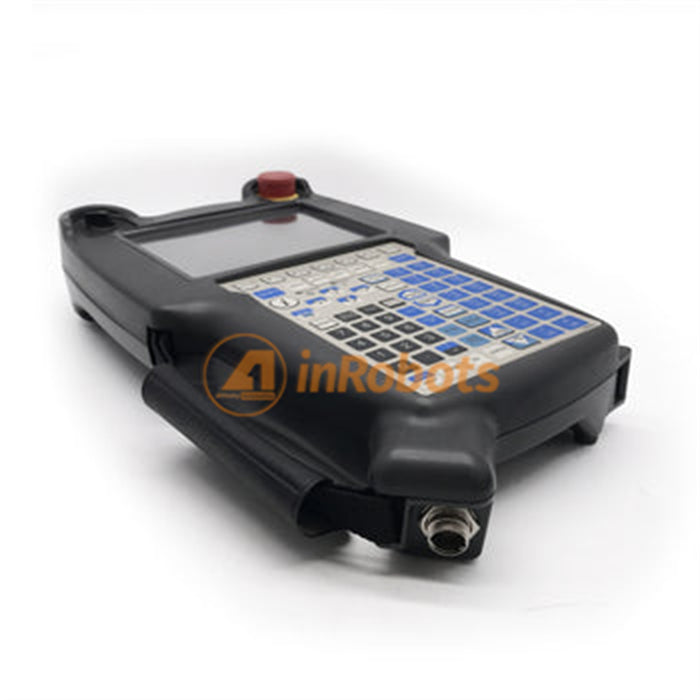
FANUC iPendant Teach Pendant A05B-2255-C101#ESW without Cable Used

Ursprünglicher Preis $1,999.00 - Ursprünglicher Preis $1,999.00
Ursprünglicher Preis
$1,999.00
$1,999.00 - $1,999.00
Aktueller Preis $1,999.00
  • Brand: FANUC
  • Model: A05B-2255-C101#ESW
  • Country of Origin:Japan
  • Condition:Used
  • Category: FANUC ? Teach Pendants


Customs Policy

As a buyer, you should be aware of possible

  • Delays from customs inspection.
  • Import duties and taxes to be paid by the buyer.
  • Brokerage fees payable at the point of delivery.

Fully Tested

  • All the inRobots.shop spare parts are fully tested for good condition before shipping to our maintainer, retailer, manufacturer in Global.  

Warranty Policy

  • New Condition: 360 Days from customer received.
  • Used Condition: 180 Days from customer received.
Shipment & Payment
  • Shipment
    Part location: Hong Kong / Shen Zhen
    Ships to: Global
    Express by: FEDEX | DHL | UPS | Economy Shipping
    Handling time: Within 1-2 business days when funds received

  • Payment
    Paypal
    Bank Wire Transfer
    Credit Card
    Shop Pay
    Gpay
    Apply Pay
    More Payment methods is coming.

FANUC iPendant Teach Pendant A05B-2255-C101#ESW ¨C
Used Teach Pendant without Cable

FANUC A05B-2255-C101#ESW iPendant Teach Pendant (Used)

Used FANUC iPendant for Robot Control (No Cable Included)


Product Overview

The FANUC iPendant Teach Pendant A05B-2255-C101#ESW is a handheld operator interface used to control, program, and monitor FANUC industrial robots.
Offered in used condition and without cable, this unit has been functionally tested to help ensure performance during teaching, commissioning, programming, and maintenance tasks.

This iPendant features ergonomic controls and display interface suited for robot operation, making it suitable as a replacement unit for systems where the original pendant has become worn or damaged.


Key Features

  • Designed for FANUC Robot Systems
    Compatible with a range of FANUC controllers that utilize the iPendant interface.

  • Used Condition (Tested)
    Inspected and tested for correct functional operation prior to shipment.

  • No Cable Included
    Supplied without teach pendant cable ¡ª allows use with existing or separately purchased cable.

  • Operator Interface
    Provides direct control for robot teaching, jogging, programming, and system monitoring.


Detailed Application Scenarios

This used iPendant is typically used in the following situations:

  • Robot Teaching & Programming
    Used to create and adjust robot motion programs.

  • System Commissioning
    Supports initial installation, calibration, and functional verification.

  • Maintenance & Diagnostics
    Enables technicians to access robot system statuses and error information.

  • Production Operation
    Used for daily robot control and adjustment on the factory floor.


Technical Specifications

Attribute Details
Part Number A05B-2255-C101#ESW
Product Type Teach Pendant (iPendant)
Compatible Controllers FANUC Robot Controllers (ESW systems)
Cable Not Included
Condition Used (Tested)
Category Teach Pendants & HMI Devices

Compatibility should be verified with the specific FANUC controller and cable configuration before installation.


Related Products & Recommendations

  • FANUC Teach Pendant Cables ¨C Compatible cables for iPendant systems

  • Teach Pendant Plastic Covers & Housings ¨C Protective parts

  • PCB & Display Components ¨C Internal electronics replacement

  • Input Assemblies ¨C Membranes, joysticks, touchpads


Why Choose InRobots?

InRobots supplies industrial robot spare parts and accessories used for maintenance, commissioning, and repair applications.
Each FANUC iPendant A05B-2255-C101#ESW Teach Pendant is tested prior to shipment to help ensure functional readiness.

Usage Tip:
Since the cable is not included, ensure you have a compatible teach pendant cable on hand or purchase one separately to complete the installation.

Blog posts

Produkte vergleichen

{"one"=>"Wählen Sie 2 oder 3 Artikel zum Vergleichen aus", "other"=>"{{ count }} von 3 Elementen ausgewählt"}

Wählen Sie das erste zu vergleichende Element aus

Wählen Sie das zweite zu vergleichende Element aus

Wählen Sie das dritte Element zum Vergleichen aus

Vergleichen